Demium Games
  • Home
  • Betting
    • Betting Sites
    • Online Casinos
    • Online Slots
  • News
  • Reviews
  • Game Guides
  • Esports
  • Platforms
    • Mobile Gaming
    • PC Gaming
    • PlayStation
    • Xbox
    • Nintendo Switch
  • Home
  • Betting
    • Betting Sites
    • Online Casinos
    • Online Slots
  • News
  • Reviews
  • Game Guides
  • Esports
  • Platforms
    • Mobile Gaming
    • PC Gaming
    • PlayStation
    • Xbox
    • Nintendo Switch
No Result
View All Result
Demium Games
No Result
View All Result
Home Game Guides Beginner Guides

Steam Cloud Saves Explained: How PC Game Progress Syncs Between Computers

Howell by Howell
November 1, 2026
in Beginner Guides, Game Guides, PC
0 0
0
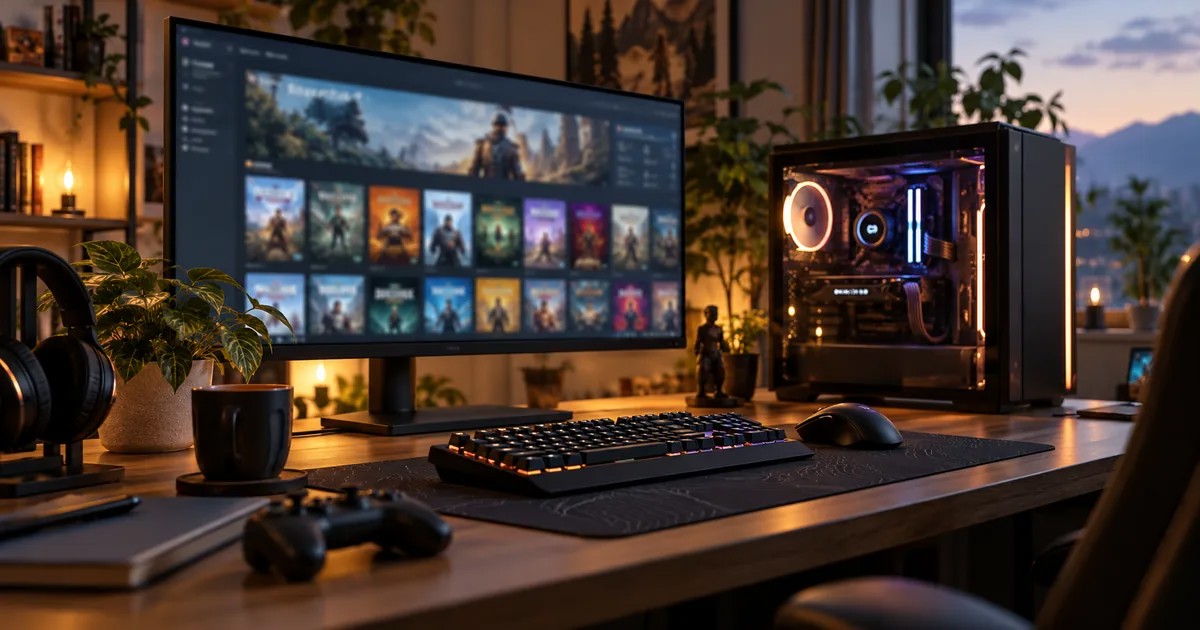
Photographic PC gaming setup with monitor and keyboard

Switching between a gaming laptop and a desktop should not mean starting every PC game from scratch. Steam Cloud is designed to synchronize supported game data between computers, but cloud storage is not a universal backup guarantee. Understanding when a game uploads and downloads its saves can help you avoid losing progress.

What Does Steam Cloud Save?

Valve’s support documentation explains that Steam Cloud allows games and Steam itself to store data such as save files, settings, profile statistics and other user-specific information. The exact files depend on how an individual game implements the feature. Steam can also synchronize some Steam client preferences between devices.

Not every game supports cloud saving, and not every game saves the same kinds of information. Players should check the game’s Steam store page and its cloud support details rather than assuming progress will transfer.

How Does Syncing Work?

For a compatible game, Steam can synchronize selected files when the game closes and retrieve relevant cloud data when the game is launched on another device. Your computers need to use the correct Steam account, have network connectivity and finish their synchronization steps successfully.

A safe routine is to close the game normally, let Steam complete its syncing activity and only then open the game on another computer. Rapidly switching between two offline devices is more likely to create competing save versions.

What Is a Steam Cloud Conflict?

A conflict can occur when local game data and cloud data differ and Steam cannot determine which version should take priority. For example, you might play offline on a laptop while another device also has an older local save. When they reconnect, two versions of your progress may exist.

If Steam shows a conflict prompt, read the file dates and any explanatory information carefully. Do not simply pick the newest-looking option without considering which device actually holds your latest progress. Where possible, preserve a local copy before resolving a conflict.
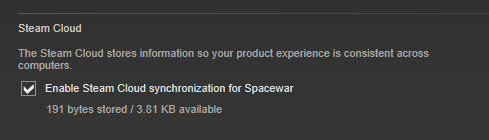
Steam Cloud synchronization checkbox in Valve's Spacewar properties reference screenshot
Valve’s Steamworks documentation uses Spacewar to illustrate per-game Cloud settings. This is a reference screenshot of an older interface, not a current Hades II or Steam Families screen. Check the Cloud setting for the actual game you are troubleshooting. Image: Valve.

Five Checks When Saves Do Not Transfer

  1. Confirm that the game supports Steam Cloud and that cloud saving is enabled for the relevant account and game.
  2. Make sure you signed in to the same Steam account on both computers.
  3. Close the game fully and allow Steam to finish syncing.
  4. Check internet connectivity and any synchronization warnings.
  5. Look for a game’s own account, launcher or save system that might operate separately from Steam Cloud.

Should You Back Up Game Saves Anyway?

Yes, particularly for lengthy single-player games or saves that matter to you. Valve cautions that support may not be able to restore lost cloud data. A separate backup stored outside the game’s active save directory can provide additional protection.

Save locations vary by title and may be inside the user’s Documents directory, an application-data folder or a game-specific path. Check a game’s documentation before copying or replacing files; manually restoring an older save can itself trigger a sync conflict.

Moving a Save to a Second PC: A Safe Routine

  1. Finish the game session on your original PC and exit normally.
  2. Wait for Steam to finish its cloud sync before shutting down or losing network connectivity.
  3. If the save matters to you, make an independent backup using the game’s documented save location.
  4. Sign into the same Steam account on your new computer and review any conflict warning carefully.
  5. Confirm your latest progress opens correctly before removing old files or reinstalling the original device.

Cloud Saves Are Not Family Sharing

Steam Families deals with access to eligible purchased games; Steam Cloud handles supported save files. They are distinct systems and should not be confused. Our Steam Families explainer covers eligibility and simultaneous play, while cross-progression explains moving progress between platforms.

Cloud Sync Is Convenience, Not a Replacement for Care

Steam Cloud makes moving between PCs easier when the game supports it and the sync process completes normally. For the best results, allow sync to finish, avoid conflicting offline sessions and maintain separate backups for important saves.

Official source: Steam Support — Steam Cloud.

Share
Tweet
Previous Post

Google Play Games on PC: Requirements, Save Sync and What Mobile Players Should Know

Next Post

Nintendo Switch 2 Backward Compatibility: What to Check Before Buying an Older Game

Howell

Howell

Howell writes about video games, gaming platforms and the technologies that connect players. His editorial interests include PC and console gaming, multiplayer systems, game mechanics and technical explainers. At Demium Games, he focuses on making complex gaming topics easier to understand through clear explanations, practical comparisons and verifiable information.

Next Post
Photographic handheld Nintendo-style gaming console in a cozy room

Nintendo Switch 2 Backward Compatibility: What to Check Before Buying an Older Game

Leave a Reply Cancel reply

Your email address will not be published. Required fields are marked *

  • Trending
  • Comments
  • Latest
Illustrated editorial banner for Hades II review featuring fantasy combat art and Demium Games 8.8 out of 10 assessment

Hades II Review (2026): Combat, Progression, Story and Our 8.8/10 Verdict

November 1, 2026
Illustration of Nintendo Switch Sports Resort sports and motion controls

Nintendo Switch Sports Resort: All 12 Sports and How the Motion Controls Work

November 1, 2026
Phantom Blade Zero actual gameplay scene showcasing combat parry

Phantom Blade Zero Review (2026): Combat, Bosses, Story and Verdict

November 1, 2026
Gaming controller representing cross-platform multiplayer and cross-play

Cross-Play vs Cross-Progression: What Gamers Need to Know

November 1, 2026
Gaming setup with computer and gaming equipment for choosing a gaming platform

How to Choose a Gaming Platform: PC, PlayStation, Xbox, Nintendo or Mobile

0
Gaming controller representing cross-platform multiplayer and cross-play

Cross-Play vs Cross-Progression: What Gamers Need to Know

0
Illustration of Nintendo Switch Sports Resort sports and motion controls

Nintendo Switch Sports Resort: All 12 Sports and How the Motion Controls Work

0
Illustration of PlayStation Plus November 2026 monthly games

PlayStation Plus November 2026 Games: Dead Island 2, Tomb Raider and Monster Train 2

0
Official Xbox screenshot illustrating the compatibility settings discussed in the FPS Boost announcement

Xbox Smart Delivery Explained: Free Upgrades, Backward Compatibility and Game Versions

November 3, 2026
Official Supercell promotional image for the launch of Clash of Clans and Clash Royale on PC

How to Play Clash of Clans on PC and Keep Your Existing Village

November 2, 2026
Official Hades II character artwork published by Supergiant Games on the game's Steam page

Hades II Controller Not Working on PC? Steam Input and Bluetooth Checks

November 2, 2026
Phantom Blade Zero actual gameplay scene showcasing combat parry

Phantom Blade Zero Review (2026): Combat, Bosses, Story and Verdict

November 1, 2026

Recommended

Official Xbox screenshot illustrating the compatibility settings discussed in the FPS Boost announcement

Xbox Smart Delivery Explained: Free Upgrades, Backward Compatibility and Game Versions

November 3, 2026
Official Supercell promotional image for the launch of Clash of Clans and Clash Royale on PC

How to Play Clash of Clans on PC and Keep Your Existing Village

November 2, 2026
Official Hades II character artwork published by Supergiant Games on the game's Steam page

Hades II Controller Not Working on PC? Steam Input and Bluetooth Checks

November 2, 2026
Phantom Blade Zero actual gameplay scene showcasing combat parry

Phantom Blade Zero Review (2026): Combat, Bosses, Story and Verdict

About Us

Demium Games covers video game news, reviews, guides and gaming culture across PC, PlayStation, Xbox, Nintendo and mobile. We focus on clear reporting and useful editorial analysis. Read more

Categories

  • Beginner Guides
  • Game Guides
  • Game Reviews
  • Game Tips & Tricks
  • Gaming Features
  • Gaming News
  • Mobile Gaming
  • Mobile Gaming News
  • Nintendo News
  • PC
  • PC Reviews
  • PlayStation News
  • PlayStation Reviews
  • PS4
  • Switch
  • Xbox One

Tags

Action Games Action Roguelike Clash of Clans Cross-Platform Cross-Play Game Design Game Guides Game Performance Game Releases Game Reviews Gaming Features Gaming News Hades II Minecraft Mobile Gaming Multiplayer Nintendo Switch PC Gaming PlayStation PlayStation Plus Sports Games Xbox
  • About Us
  • Advertise
  • Privacy Policy
  • Write For Us
  • Contact Us

© 2026 Demium Games. All Rights Reserved.

Welcome Back!

Login to your account below

Forgotten Password?

Retrieve your password

Please enter your username or email address to reset your password.

Log In
No Result
View All Result
  • Home
  • Betting
    • Betting Sites
    • Online Casinos
    • Online Slots
  • News
  • Reviews
  • Game Guides
  • Esports
  • Platforms
    • Mobile Gaming
    • PC Gaming
    • PlayStation
    • Xbox
    • Nintendo Switch

© 2026 Demium Games. All Rights Reserved.